
Description
RadioDJ versions 2 and 3 supported!
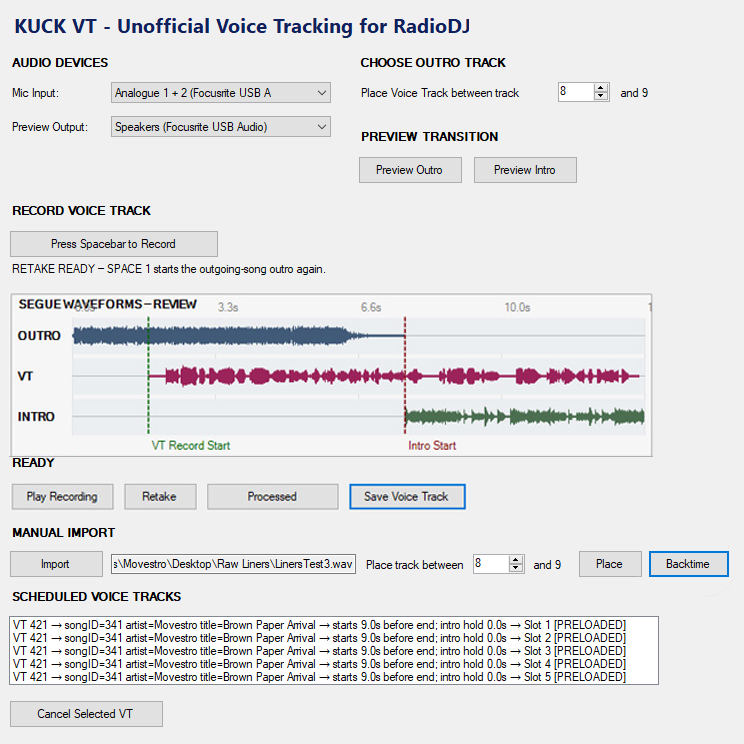
KUCK VT – Voice Tracking for RadioDJ brings a fast, natural voice-tracking workflow directly into RadioDJ. Designed for independent broadcasters, internet radio stations, and automated music formats, KUCK VT makes it possible to create polished transitions without relying on external audio editors or complicated production systems.
Using an intuitive four-step recording process, the presenter previews the outgoing song, begins recording over the outro, starts the incoming song at exactly the right moment, and then finishes the voice track. KUCK VT captures the entire transition, preserves the timing of the incoming song, and uses smooth native RadioDJ ducking to keep the music underneath the voice without abrupt volume changes.
Once the recording is approved, KUCK VT saves the finished voice track, imports it into RadioDJ, places it at the selected position in the playlist, and prepares the next placement automatically. Synchronized placement controls make it easy to move through an entire show efficiently, allowing multiple voice tracks to be produced in sequence without constantly resetting the workflow.
KUCK VT also includes a dedicated Manual Import section for interviews, prerecorded segments, and other externally produced audio. Imported files can be categorized and placed directly into the active playlist from the same interface, giving broadcasters one convenient tool for both voice tracking and program assembly.
Built for Real-World Radio Workflows
KUCK VT provides:
- A streamlined four-step voice-tracking process
- Smooth RadioDJ native music ducking and restoration
- Accurate outgoing-song and incoming-song timing
- Direct playlist placement
- Automatic advancement to the next transition
- Synchronized voice-track and manual-import placement controls
- Microphone and preview-output device selection
- Outro and intro preview controls
- Recording review, retake, and approval options
- Support for prerecorded interviews and specialty segments
- Automatic, descriptive voice-track file naming
- Backtiming for imported files, hit the post every time!
KUCK VT was created for broadcasters who want the sound of a carefully produced live show with the flexibility of automation. Record an hour, a weekend, or an entire week of programming on your own schedule—and let RadioDJ handle the broadcast.
Spend less time assembling audio and more time sounding like you are live.
PLEASE READ BEFORE PURCHASING
RadioDJ Compatibility
KUCK VT is designed for RadioDJ (versions 2 and 3). RadioDJ is not included but is a free download here: https://www.radiodj.ro/
- KUCK VT must be used with a compatible installation of RadioDJ.
- RadioDJ is not included with KUCK VT and must be downloaded and installed separately.
- The RadioDJ REST Server plugin must be installed before using KUCK VT. Open the “Disabled Plugins” folder in your RadioDJ installation and move the following files into the “Plugins” folder:Plugin_RestServer.dll
Plugin_RestServer.xml - If you get an error caused by REST Server (that is not our plugin) the simple fix is to run RadioDJ in Administrator mode.
- Feel free to watch our install guide here: https://youtu.be/MEQFv-nHZ8w
Important Compatibility Notice
KUCK VT will not work with RadioDJ 1.x.
KUCK VT will not work with automation software other than RadioDJ.
SYSTEM REQUIREMENTS
- OS: Windows 10 or Windows 11 (64-bit)
- RAM: 4GB minimum, 8GB recommended
- CPU: Any modern dual-core processor
- Disk: 50MB for installation
- Software: RadioDJv2 or RadioDJv3 with REST API plugin enabled
- Audio: A microphone or audio interface input, and a (if live broadcasting) separate preview output device (headphones recommended)
- .NET Framework: 4.8 (included with Windows 10/11)
Reviews
There are no reviews yet.